n8n Lead Enrichment Automation: Step-by-Step Setup
How to combine Clay, Apollo and OpenAI inside n8n to build an automatic enrichment workflow for every new lead.
TL;DR — Summary
- n8n is more flexible than Zapier, self-hostable and cost-scalable.
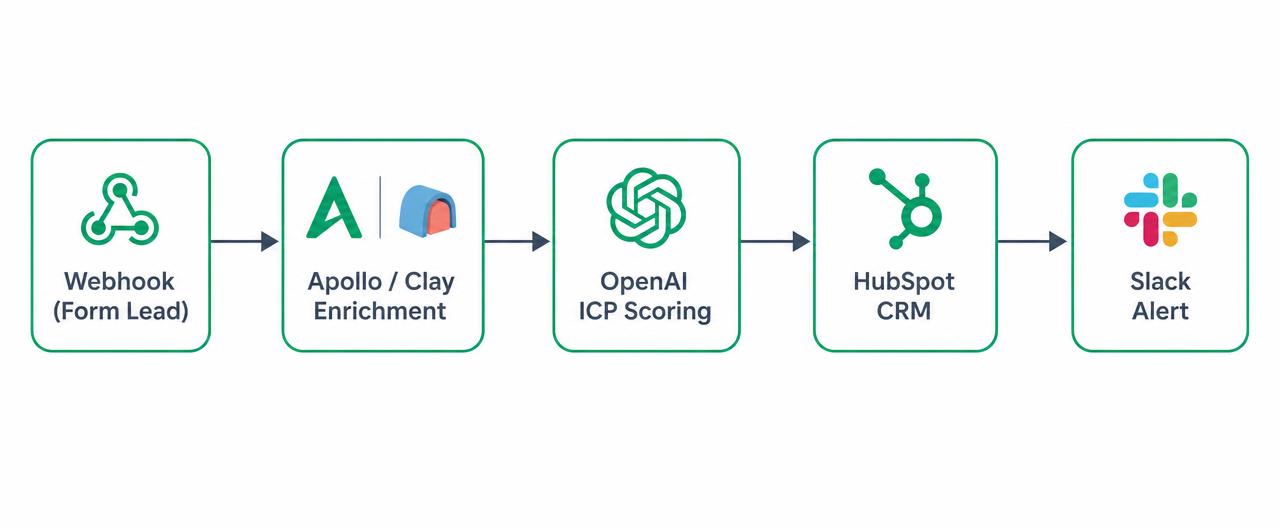
- The enrichment flow is: webhook → Apollo/Clay enrichment → LLM-based ICP scoring → write to CRM.
- Summarizing lead notes with OpenAI/Gemini and pushing them into HubSpot boosts SDR efficiency by 30%+.
- The critical factor is data quality — bad enrichment burns the entire SDR team's time.
Why n8n Beats Zapier
Because n8n can be self-hosted, it wins on data sovereignty and cost. Beyond 400+ native integrations, a custom HTTP node connects to any API. Rich branching (if/switch) and JavaScript nodes make scenarios possible that Zapier cannot handle.
The cost gap widens with volume. Zapier bills per task, so a five-step flow burns five tasks per lead; n8n prices per execution, and a self-hosted install costs nothing beyond the server. For a B2B team processing thousands of leads a month, the difference is often close to 10x.
If you handle GDPR-scoped data, self-hosted n8n keeps lead records off a third-party SaaS server entirely. It installs in about 15 minutes with Docker; use Postgres for persistence and basic auth or a reverse proxy for security.
Architecture of the Enrichment Flow
A typical lead enrichment flow has these steps:
- Webhook: a lead's form submission lands in n8n.
- Apollo/Clay: company info, employee count and tech stack are pulled by email.
- OpenAI: an LLM prompt summarizes lead notes and scores ICP fit (0–100).
- HubSpot/Pipedrive: enriched data is written to the CRM and an owner is assigned.
- Slack: high-scoring leads notify the SDR team in real time.
Step-by-Step Setup: Webhook and Data Normalization
Create a new workflow in n8n and add a Webhook trigger as the first node. Set the method to POST, copy the generated production URL and paste it into your form tool (Typeform, HubSpot Forms, a custom form). The test URL only works while the editor is open, so switch to the production URL before going live.
Every tool names its payload fields differently. Add a Set (Edit Fields) node right after the trigger and normalize everything into one schema: email, full_name, company_domain, source, utm_campaign. Skip this and you'll rewrite the whole flow each time a new source is added.
Finish with an IF node for basic validation: branch off leads with an empty email or a free domain such as gmail or hotmail. Not sending free-domain leads to the enrichment API saves credits and removes bad matches before they enter the pipeline.
Step-by-Step Setup: Enrichment and Scoring Nodes
For enrichment, call Apollo's people/match endpoint with an HTTP Request node and authenticate through n8n Credentials — never hard-code the API key inside the node. Pull company name, employee count, industry, country and tech stack from the response. If Apollo returns nothing, add a fallback branch that queries a second source such as Clay or Hunter.
Enrichment APIs enforce rate limits. Turn on 'Retry on Fail' with 2–3 attempts and increasing wait time, and use a Split In Batches node with groups of 10 for bulk imports. That way a 429 response doesn't take the whole workflow down.
For scoring, send the normalized record to an OpenAI node and request a 0–100 score, a three-bullet rationale and a recommended next step via JSON schema. Validate the model output with a Code node before writing to the CRM; if the shape is unexpected, route the lead into a manual-review branch.
Step-by-Step Setup: CRM, Alerts and Error Handling
In the HubSpot node use the 'Create or Update Contact' operation with email as the unique key, otherwise every form submission creates a duplicate record. Write the score, the rationale and the enrichment fields into custom properties so sales can filter lists on them.
Add a Switch node to branch on the score: 70+ posts a rich message to the SDR Slack channel and assigns an owner, 40–69 goes to the nurture list, below 40 is stored in the CRM only. Including the CRM record link in the Slack message noticeably shortens SDR response time.
Finally, define a separate Error Workflow and attach it in the main workflow's settings. On failure it should alert your ops channel and write the failed payload to a Postgres table or Google Sheet, so no lead disappears silently and you can reprocess records once the issue is fixed.
LLM Prompting Tips
Give the model a clean criteria list for ICP fit scoring. Instead of vague questions like 'how well does this company match our ICP?', ask for a score based on industry, employee count and tech. Use structured output (JSON schema) so downstream nodes can process the data without breaking.
Add two or three few-shot examples to the prompt: one ideal customer, one borderline, one clearly out of scope. Examples keep scores consistent over time. Keep temperature between 0 and 0.2 — you want repeatability, not creativity.
Frequently Asked Questions
Should I use n8n Cloud or self-hosted?
Which enrichment sources are most accurate?
How does MCP (Model Context Protocol) fit in here?
Digital marketing specialist building websites, performance ad programs and B2B lead generation systems for B2B and e-commerce brands.
Connect on LinkedIn ↗Last updated: